
Dialogue / Sample 1
Original recording and NoizMoth-processed audio.
Press Play to compare.
Clean up the background. Keep the voice’s character. NoizMoth reduces unwanted noise with a focus on natural dialogue timbre and low-end body—so the performance stays at the centre of the scene.
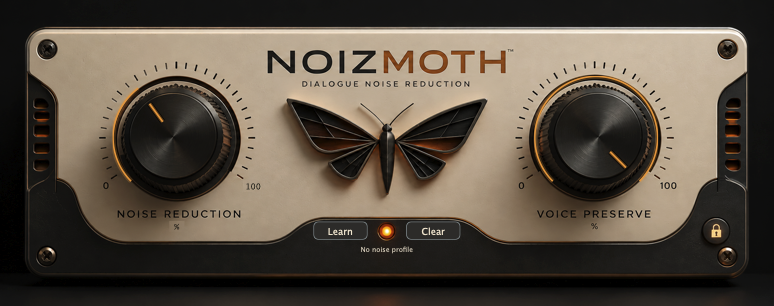
Dialogue is more than intelligibility. It is the weight of a quiet line, the texture of a breath and the character of the person speaking.
NoizMoth is designed to reduce background noise while protecting the voice’s natural timbre and low-frequency body. Clean up room tone, hiss and production noise with control over how far you push the result.
Preserve the recording’s voice. Shape the balance between cleanup and detail, then listen in context with the scene.
Switch between the original and processed audio at the same point in the recording. Headphones are recommended.
Original recording and NoizMoth-processed audio.
Press Play to compare.
Original recording and NoizMoth-processed audio.
Press Play to compare.
High-quality AAC listening copies of the supplied recordings, encoded with the same settings. No additional EQ, dynamics processing or loudness normalisation. Switch versions to compare the voice, background and word endings. Results vary with the recording and settings.
Move from 0% to 100% to increase suppression. Start gently and turn up until the background sits where you need it. At 0%, hear the unprocessed sound with timing kept aligned.
Choose how conservatively NoizMoth protects vocal detail. Turn up for greater protection of texture, breaths and word endings; turn down when stronger cleanup matters more. Listen to both the words and the space around them.
Automatic processing gets you started. Learn captures a noise-only passage to guide additional cleanup for that recording.
Select a few seconds of representative room tone or background sound, with no dialogue or breaths.
Click Learn, then play or use AudioSuite Preview. After two seconds of usable audio, wait for “Noise profile ready”.
Select the dialogue, adjust both controls and compare. Clear removes the profile; completed profiles save with the session.
Start a 14-day trial from the plugin’s lock icon. A paid license supports two computers.
Prefer Gumroad? Buy NoizMoth on Gumroad ↗
macOS 12 or later · Apple silicon and Intel · AAX Native, AudioSuite, VST3 and AU. Use a compatible DAW. Built for editing and mixing.
Installation, activation, both controls, Learn, AudioSuite and practical dialogue-cleaning tips.
Read the illustrated manual ↗12 pages · PDF · Version 1.1.0
NoizMoth starts at 0% Noise Reduction. Turn it up to hear processing; Voice Preserve starts at 75%.
Results depend on the recording. Stronger reduction can quiet pauses substantially, but background sound overlapping speech may remain. Choose settings that keep the words clear and natural.
Yes. Open NoizMoth from AudioSuite to preview and render selected clips. Learn from a noise-only selection first if you want to use a noise profile.
NoizMoth adds processing delay and is best used for editing and mixing. Enable your DAW’s delay compensation.
Audio processing runs locally on your Mac. Internet access is used for activation and license renewal.