Shape existing low end.
Reinforce low-frequency audio around your chosen Frequency with adjustable enhancement and resonance.
Reinforce existing low end. Generate tuned sub impacts. Bring weight to gunshots, explosions, rumbles and music with focused control for your LFE auxes.
Free 14-day trial · Two computers per paid license · Secure Payhip checkout
Read the illustrated user manual (PDF) ↗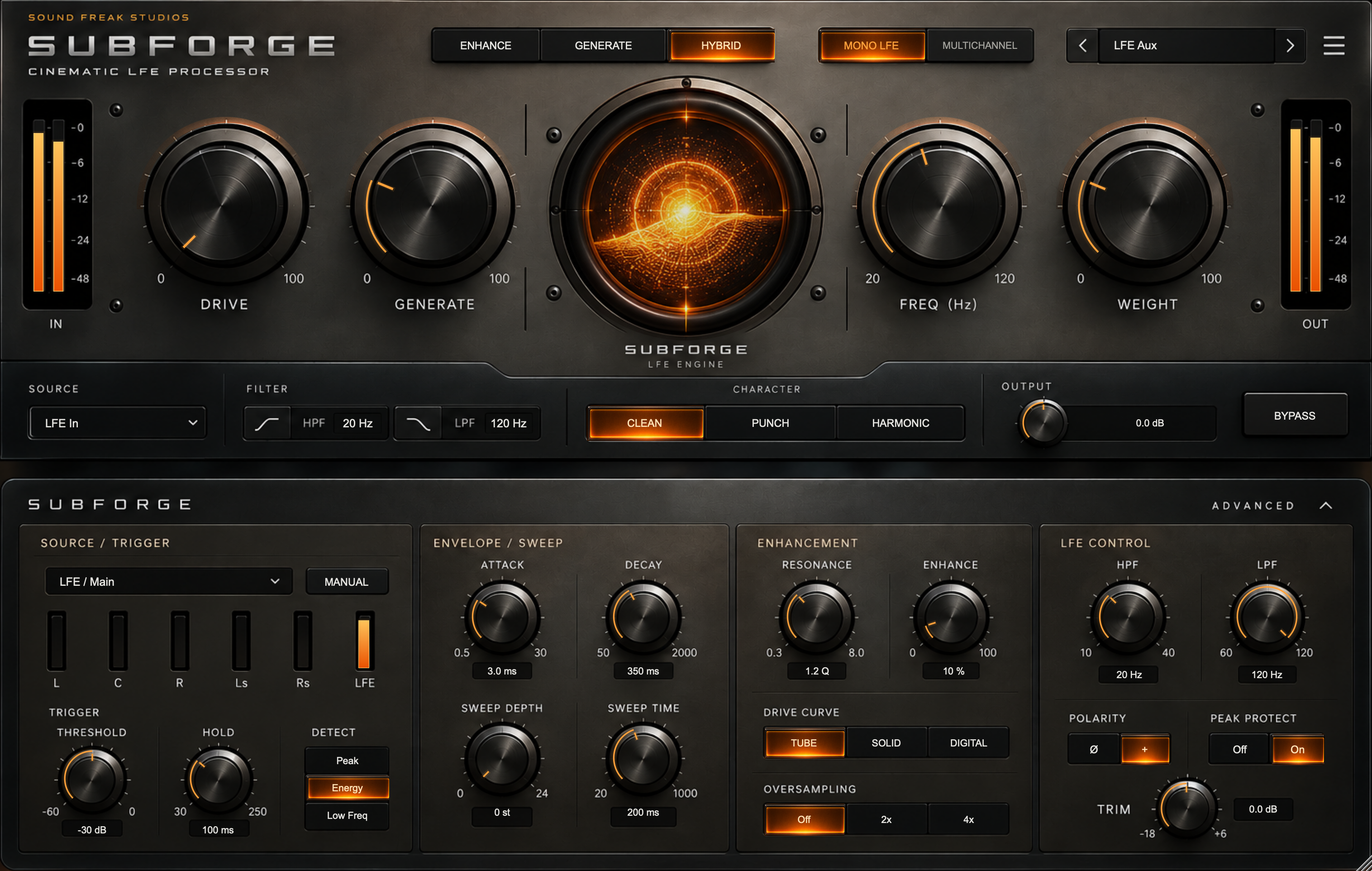
Shape the low end that is already there, or add a dedicated sub layer beneath the attack. SUBFORGE combines LFE enhancement and transient-triggered sine generation for film, television, trailers and immersive mixing.
Use Enhance to reinforce existing content, Generate for tuned sub impacts, or Hybrid to combine both. Set the target frequency, match the tail to the scene and balance the result against the full mix.
The LFE Aux startup settings keep dedicated music and effects returns in mind: LFE In, LFE / Main detection, restrained Hybrid/Clean and no pitch sweep.
Reinforce low-frequency audio around your chosen Frequency with adjustable enhancement and resonance.
Trigger a tuned sine-based layer from an incoming transient, with source-responsive dynamics and optional downward sweep.
Combine enhanced LFE with generated energy, then shape the character, filtering and final output.
The main panel handles the sound. Expand Advanced when the source, envelope or output needs a closer adjustment.
Introduce controlled saturation. Compare Tube, Solid and Digital curves, or keep Drive at zero for a clean path.
Set the amount of synthesized sub independently of the existing LFE. Softer qualifying onsets produce softer impacts.
Choose the generated fundamental from 20–120 Hz and the enhancement centre. Add a downward sweep in Advanced when the sound calls for it.
Lengthen the generated decay without adding output gain. Enable Manual to adjust Decay directly.
Go further in Advanced: threshold and holdoff, Peak / Energy / Low Freq detection, source selection, external sidechain, attack and decay, pitch sweep, resonance, output filters, polarity, sample-peak protection and optional 2x/4x oversampling.
Hover over a control for about 3.5 seconds for a short explanation.
Insert on a dedicated MX or FX LFE aux. Keep LFE In and LFE / Main detection. Use Enhance for existing audio, or Hybrid to add generated energy.
Keep the original gunshot on its full-range route. Send a copy to a separate mono return, choose Source-to-Sub and Generate, then route the return to LFE.
Set Threshold for the intended attack, Frequency for the note and Weight for the tail. Compare normal and inverted polarity when combining with other bass.
Keep an independent downstream low-pass filter and conservative trim on Source-to-Sub returns. A DAW hard bypass or removal can pass the original source around the plug-in; mute the return before changing routing.
For compatible Pro Tools systems.
For Nuendo, Cubase and compatible hosts.
For Logic Pro and compatible AU hosts.
| Operating system | macOS 11 or later |
|---|---|
| Architecture | Apple silicon + Intel (Universal) |
| Formats | AAX Native, VST3 and AUv2 |
| Layouts | Mono, stereo, 5.1, 7.1 and 7.1.2 |
Windows coming soon. The current download is for macOS.
Use a compatible DAW and operating-system combination. In Atmos sessions, use a suitable LFE feed or supported bed/aux layout. Object panning and renderer routing remain in the DAW. SUBFORGE creates tuned impacts; it does not automatically follow source pitch.
Oversampling Off adds zero latency; 2x/4x adds 16 samples to all channels and requires a reload or reinitialization. Peak protection acts on sample peaks, not true peaks.
The illustrated 19-page manual covers installation, activation, trial and offline use, LFE aux and mono gunshot routing, multichannel use, every control, presets and troubleshooting.
Read the illustrated user manual (PDF) ↗
Download the manual · 19 pages · 9.67 MB
Need a hand? hello@soundfreakstudios.com
Download the free demo through Payhip, then open Settings > License > Activate / trial / deactivate... and choose Start 14-day trial while online.
The trial is fully functional. The same installer handles trial and purchased activation, so you can keep your session settings when you buy.
One paid license supports two computers. Internet access is required for first activation and periodic renewal; valid paid authorization allows up to 30 days offline.
Available now for macOS. Windows coming soon.
Start on a dedicated music or effects LFE aux with LFE In and LFE / Main detection. For a mono gunshot, send a copy to a separate sub return, choose Source-to-Sub and Generate, and route that return to LFE. Keep the original full-range sound on its own route.
Enhance shapes existing low-frequency audio. Generate outputs triggered sine-based sub impacts. Hybrid combines both. Frequency sets a tuned target; the generator does not automatically follow source pitch.
Supported layouts are mono, stereo, 5.1, 7.1 and 7.1.2. On a supported multichannel bus, SUBFORGE processes the actual LFE channel. In an Atmos session, use a suitable LFE feed or supported bed/aux; object panning and renderer routing remain in the DAW.
The current download is for macOS 11 or later on Intel and Apple silicon, in AAX Native, VST3 and AU formats. Windows is coming soon.
Download the free demo through Payhip, then open the plug-in settings menu > License > Activate / trial / deactivate... and choose Start 14-day trial while online. The fully functional trial lasts 14 days. Activate a purchase in the same installer with your purchase email and license key.
A paid license supports up to two computers. Internet is required for initial activation and periodic renewal; valid paid authorization allows up to 30 days offline. Deactivate a seat in License settings before moving to another computer.
Use a separate mono/stereo return with an independent downstream low-pass filter and conservative output trim. A DAW hard bypass, disable or removal can pass the original source around the plug-in. Mute the return before changing routing. SUBFORGE’s own BYPASS mutes mono/stereo Source-to-Sub.
Off adds zero latency. 2x/4x reduces saturation aliasing and adds 16 samples to all channels. Reload or reinitialize after changing quality. Peak Protect limits sample peaks; it is not a true-peak limiter.
Cinematic LFE enhancement and tuned sub generation for dedicated returns, film effects and immersive mixing.
macOS · AAX Native + VST3 + AU · Windows coming soon