Home  /  Plugins  /  DXFill

DXFill / Dialogue removal + room tone

Remove the Voice.
Keep the Scene.

Suppress dialogue while retaining production effects, or build a continuous ambience bed from your recording. Two modes. Your scene. A cleaner edit.

AAX AudioSuiteVST3AUmacOS 11+Apple silicon + Intel

Free 14-day demo · Secure Payhip checkout

Prefer Gumroad? Get DXFill on Gumroad ↗

Read the illustrated user manual (PDF) ↗
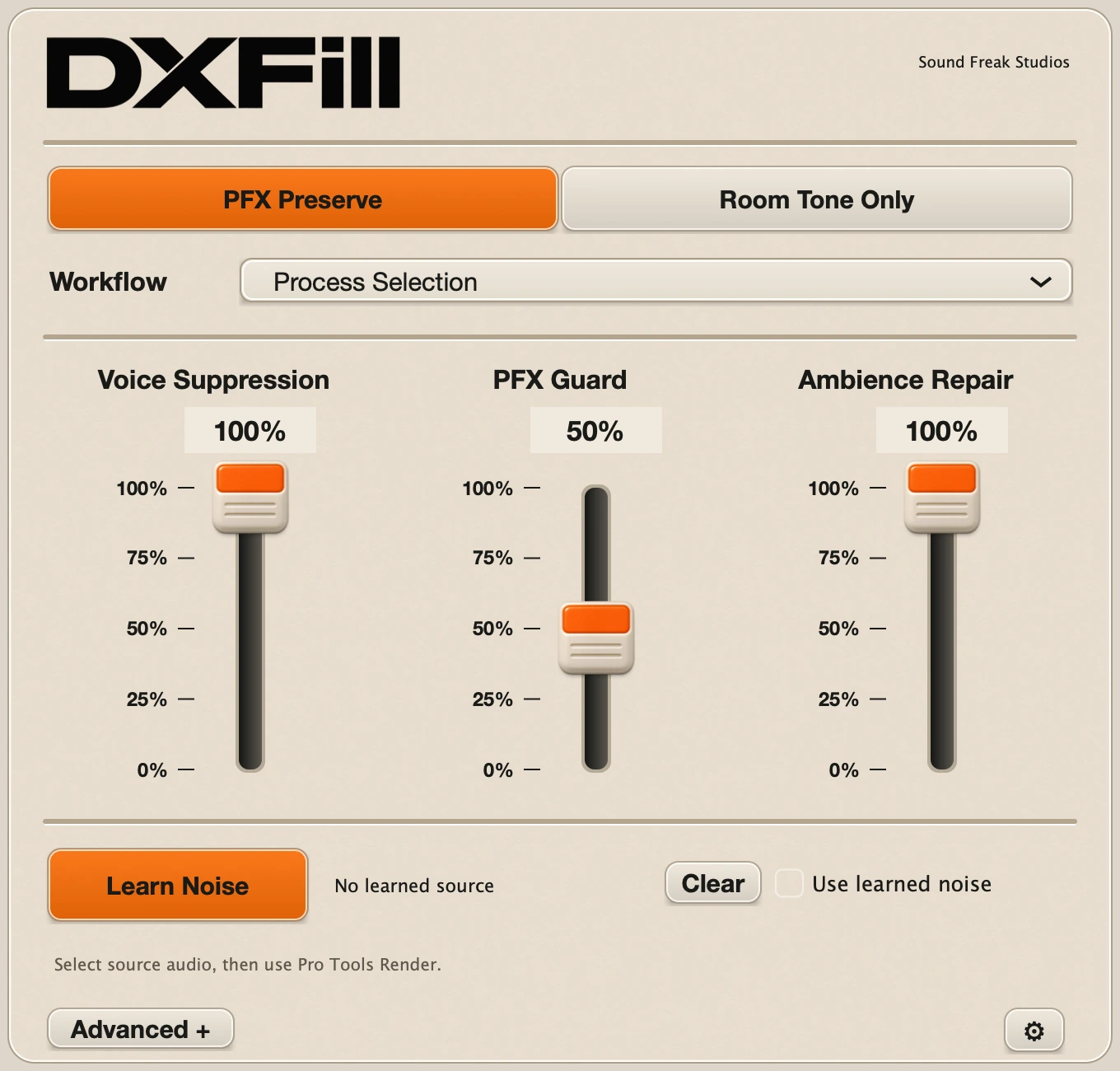
DXFill cream and orange interface with PFX Preserve selected and Voice Suppression, PFX Guard and Ambience Repair faders
Actual interface · Version 1.0.0View full-size ↗
PFX PreserveRoom Tone OnlyLearn your own ambienceLocal audio processing
The background belongs to the scene

Keep the footsteps.
Fill the silence.

Dialogue can sit over the sounds you need: footsteps, clothing movement, handling noise and the room itself. DXFill helps separate the voice from that background.

Use PFX Preserve when production effects should remain. Switch to Room Tone Only when you want a steadier bed for an edit, transition or ambience track.

Learn Noise takes a representative source from your recording. Use it to guide another passage, or generate room tone for a selected duration. Your audio stays on your computer.

Two focused modes

Keep the events.
Or keep only the room.

PFX Preserve controls

PFX Preserve

Voice Suppression sets dialogue attenuation. PFX Guard protects likely production effects. Ambience Repair fills the background where suppression removes source energy.

Advanced choices refine residual voice cleanup and transient protection.

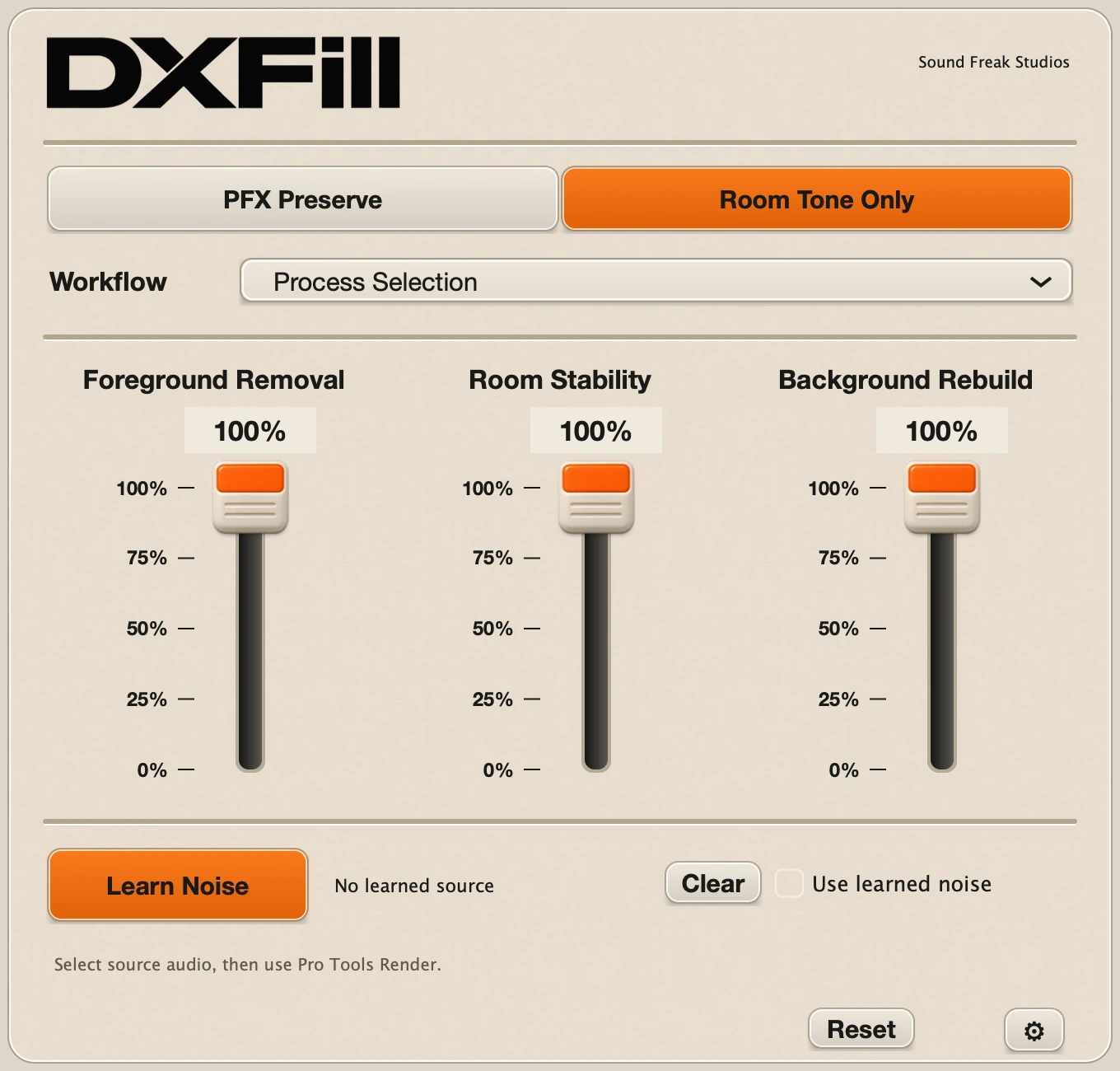
Room Tone Only controls for Foreground Removal, Room Stability and Background Rebuild

Room Tone Only

Foreground Removal reduces speech and foreground events. Room Stability moves toward a stationary bed. Background Rebuild controls the reconstructed ambience fill.

Learn a clean reference when the background needs a more specific match.

See DXFill in a session

Watch the full demo.

Explore dialogue removal and ambience workflows in Pro Tools.

Watch on YouTube ↗

Offline by design

Select. Learn. Render.

01 / SELECT

Start with the scene.

In Pro Tools, select mono or stereo audio and open DXFill from AudioSuite. In VST3 or AU, capture the passage and click Stop.

02 / SHAPE

Choose what stays.

Pick PFX Preserve or Room Tone Only. Adjust the three controls. Optionally learn clean ambience and enable Use learned noise.

03 / RENDER

Bring it into the edit.

Click the AudioSuite Render button. For VST3/AU, choose Process & Save WAV and import the 24-bit result into your session.

To generate ambience, learn a source and choose Render Learned Noise. Learned sources and captured audio are temporary; keep your reference clip and export before closing the instance.

macOS / Version 1.0.0

Three formats.
One installer.

AAX AudioSuite

Offline processing of selected audio in Pro Tools.

VST3

Capture, process and export in compatible VST3 hosts.

Audio Unit

Capture, process and export in compatible AU hosts.

Operating systemmacOS 11 or later
ArchitectureIntel + Apple silicon (Universal)
AudioMono / stereo · 44.1–192 kHz
LicenseTwo computers · 14-day trial

Use a compatible host and macOS combination. AAX is AudioSuite-only. VST3/AU live input passes through unchanged; processed audio is exported as a WAV. VST3/AU captures are limited to 120 seconds.

Installation + user manual

Your first scene,
step by step.

  1. Close your DAW and run the universal macOS installer.
  2. Open DXFill and activate your purchase or start the trial online.
  3. Choose the mode and workflow for your scene.
  4. Render or export, then review against the original.

The 13-page illustrated guide covers every control, Learn Noise, generated room tone, AudioSuite, VST3/AU capture, activation and troubleshooting.

Read the user manual (PDF) ↗

Download the manual · 13 pages

Need a hand? hello@soundfreakstudios.com

Try your own recordings

14 days.
Your scene. Your ears.

Get the free demo from Payhip, then choose Start 14-day Trial inside DXFill while online. The trial includes full processing and uses the same installer as the purchased version.

Activate with your purchase email and DXFill license key from Payhip or Gumroad. A paid license supports two computers and up to 30 days offline after successful activation or renewal.

The settings gear holds licensing and interface-size options. A small Trial badge appears during trial use. New processing requires valid authorization.

DXFill FAQ

Before your first render.

Does DXFill process audio live?

DXFill works offline. AAX processes selections in Pro Tools AudioSuite. VST3 and AU capture up to 120 seconds of incoming audio, then process and export a 24-bit WAV. Live input passes through unchanged.

What is the difference between the two modes?

PFX Preserve suppresses dialogue while protecting production effects. Room Tone Only reduces dialogue and foreground events to create a steadier background bed.

How do I learn and generate room tone?

Select clean, audible ambience and click Learn Noise in AudioSuite. Use host Analyze if needed. In VST3 or AU, capture the source first and then click Learn Noise. Choose Render Learned Noise to create an ambience bed for the destination duration.

Are learned sources saved with my session?

No. Learned sources and captured audio stay in the current plugin instance. Keep your reference clip so you can learn again, and save exported WAVs before closing the instance.

Which systems are supported?

macOS 11 or later on Intel and Apple silicon. AAX AudioSuite, VST3 and AU are included. Supports mono and stereo at 44.1–192 kHz. Your host may require a newer operating system. There is no Windows installer.

How do trial and paid activation work?

Start the fully functional 14-day trial online inside DXFill. Activate a purchase with your email and DXFill license key from Payhip or Gumroad. A paid license supports two computers, with up to 30 days offline after successful activation or renewal. Licensing lives in the settings gear.

Will every voice and effect separate perfectly?

Results depend on the recording, especially where dialogue and production effects overlap. Compare the original, adjust the controls and use a representative ambience reference for the scene.
DXFill by Sound Freak Studios

Remove the Voice.
Keep the Scene.

Dialogue removal, production-effects preservation and room tone from your own recordings.

macOS · AAX AudioSuite + VST3 + AU · Free 14-day demo