
Read the circle.
Green OPEN passes full microphone level. Amber DIM applies your chosen attenuation. Red MUTE silences the output. The transport label below confirms the current session state.
Talk between takes. Keep the session moving. Let your DAW transport open, dim or mute the talkback microphone automatically. Speak when you need to with TALK OVERRIDE, then get straight back to the take.
Free 14-day demo · Secure Payhip checkout
Prefer Gumroad? Get TB//DIM on Gumroad ↗
Read the user manual (PDF) ↗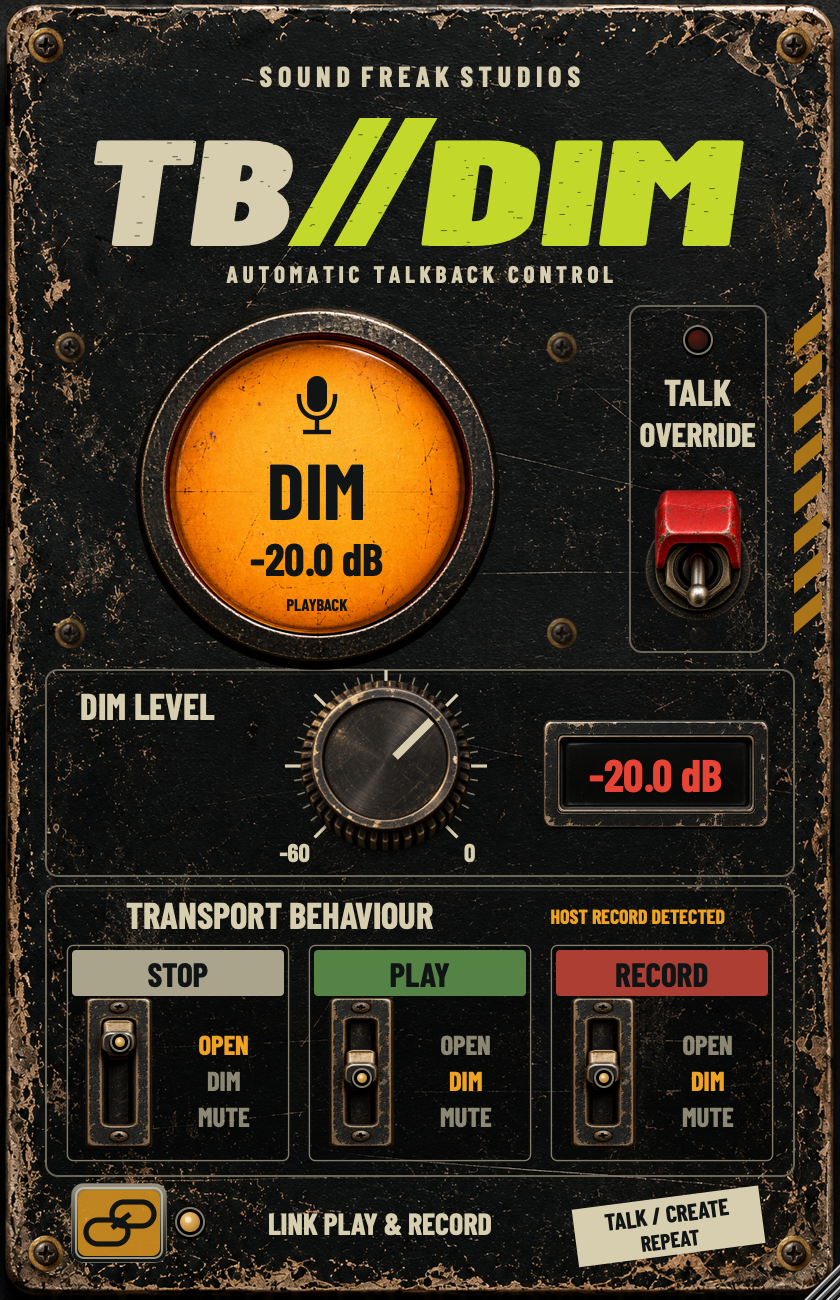
A quick direction, a pickup request, one more take. TB//DIM gives your talkback microphone a clear job in every part of the session.
Choose OPEN, DIM or MUTE for STOP, PLAY and RECORD. Keep playback and recording linked, or set separate actions when your host supplies recording status. The large illuminated circle shows what the microphone is doing now.
The worn metal faceplate, physical switches and red DIM readout put the controls where you can find them. Hold to talk, or choose latch mode when a longer conversation needs the microphone to stay open.
One unmistakable status circle. Three transport choices. Talk override within reach.
Green OPEN passes full microphone level. Amber DIM applies your chosen attenuation. Red MUTE silences the output. The transport label below confirms the current session state.
Hold TALK OVERRIDE or the main circle to speak. Choose latch mode from the right-click menu for click-to-toggle operation. Releasing override returns to the transport choice.
Set DIM from -60 dB to 0 dB in 5 dB steps. Drag the knob or use the wheel. Double-click the red readout to type a value; double-click the knob to restore -20 dB.
Click the physical STOP, PLAY and RECORD switches to move through their positions, or drag up and down. Link PLAY & RECORD to keep the same action for both.
Insert TB//DIM on the dedicated track or AUX carrying your microphone to the intended cue or headphone mix.
STOP: OPEN. PLAY: DIM. RECORD: DIM. A -20 dB DIM setting and linked playback/recording give you a useful starting point.
Test stop, play and record, then hold TALK OVERRIDE when you need to speak at full level. Set all three actions to MUTE for a push-to-talk workflow.
Keep the talkback path out of the programme or recorded mix unless intended. Check the cue level and avoid a microphone-to-speaker feedback loop before the session.
For compatible Pro Tools systems.
For Nuendo, Cubase and compatible VST3 hosts.
For Logic Pro and compatible AU hosts.
| Operating system | macOS 12 Monterey or later |
|---|---|
| Architecture | Apple silicon + Intel (Universal) |
| Formats | AAX Native, VST3 and AU |
| License | Two computers per paid license |
| Demo | 14 days; internet required to start |
Use a DAW version compatible with your Mac and macOS version. If the host does not supply independent recording status, RECORD follows PLAY. This release is for Mac.
The illustrated manual covers routing, every control, demo and paid activation, everyday workflows and troubleshooting.
Download the manual · 13 pages
Need a hand? hello@soundfreakstudios.com
Get the free demo through Payhip, then choose TRY DEMO in the plug-in while online to start your 14 days.
Demo mode adds a small TRIAL VERSION banner at the top right. After paid activation, the interface contains only the talkback controls.
Use your purchase email and TB//DIM license key from Payhip or Gumroad. One paid license supports two computers, with up to 30 days offline before renewal.
When the demo ends or authorization expires, talkback output is muted until valid authorization is restored.
TB//DIM is available for macOS 12 or later on Apple silicon and Intel. The installer includes AAX Native for compatible Pro Tools systems, VST3 for Nuendo, Cubase and other compatible hosts, and AU for Logic Pro. Use a DAW version that supports your Mac and macOS version.
Insert it on the dedicated track or AUX carrying your talkback microphone to the intended cue or headphone mix. Keep that path out of your programme or recorded mix unless you deliberately want talkback there.
Yes. Choose OPEN, DIM or MUTE for STOP, PLAY and RECORD. Turn off LINK PLAY & RECORD to set the two separately when your DAW supplies recording status. When RECORD FOLLOWS PLAY is shown, the PLAY setting handles both.
Click the physical switch to move through its positions, or drag it vertically: up is OPEN, middle is DIM and down is MUTE. DIM adjusts from -60 dB to 0 dB in 5 dB steps. Double-click the red readout to type a value, or double-click the knob to reset to -20 dB.
Both. Hold TALK OVERRIDE or the main circle to speak at full level in momentary mode. Right-click either control to choose latch mode, then click to open and click again to release. Escape or closing the plug-in window clears override.
Download the free demo and start the 14-day trial online from the plug-in. Activate a purchase with your purchase email and TB//DIM license key from Payhip or Gumroad. A paid license supports two computers, with up to 30 days offline before renewal. After paid activation, license controls disappear. Demo mode shows a small TRIAL VERSION banner. When authorization expires, talkback output is muted until valid authorization is restored.
Bypass passes the incoming microphone at full level. Use the MUTE action when you want silence on the talkback path. If host transport is unavailable, automatic operation defaults to MUTE.
Automatic talkback control for recording, dialogue, ADR and the conversations that keep a session moving.
macOS · AAX Native + VST3 + AU · Free 14-day demo