
Warmth
Adds harmonic colour, body and subtle saturation to dialogue.
Use it to gently enrich a clean recording or push the signal toward a more noticeably coloured sound.
DXSat combines harmonic enhancement with controlled parallel compression, helping you add body, character and consistency to dialogue without building complicated processing chains.
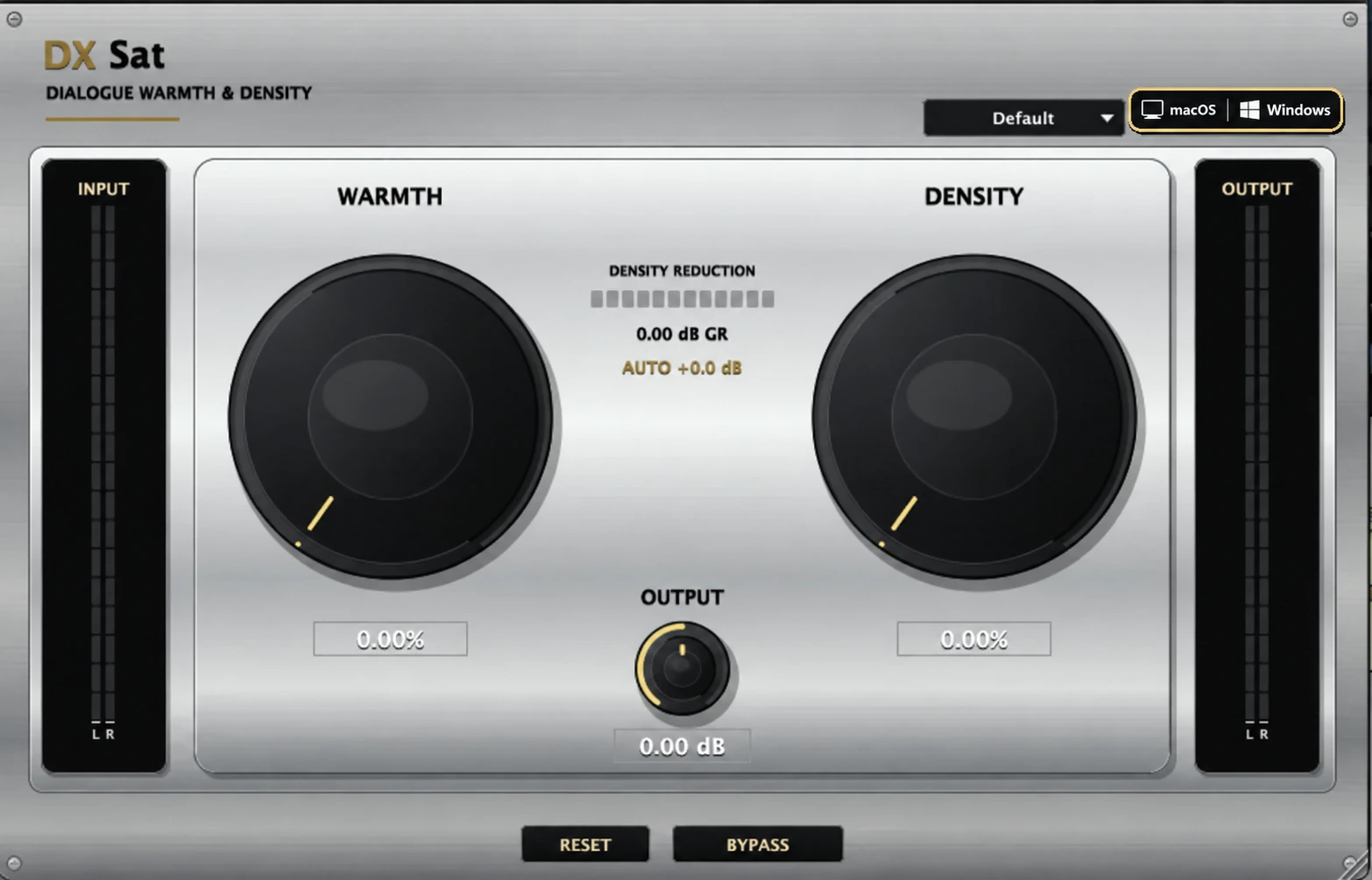
Use DXSat on individual dialogue tracks or supported dialogue buses. The available layout still depends on the bus formats exposed by your DAW and the selected AAX, VST3 or AU version.
Whether you are working with production dialogue, ADR, voice-over, podcasts or a complete dialogue bus, DXSat provides a focused set of controls that lets you shape the sound quickly.
Adds harmonic colour, body and subtle saturation to dialogue.
Use it to gently enrich a clean recording or push the signal toward a more noticeably coloured sound.
Adds controlled compression and perceived thickness while retaining the natural character of the source.
It can help dialogue feel more consistent and substantial without requiring a separate parallel compression setup.
Adjusts the final output level after processing.
Listen to DXSat on dialogue and compare the processed signal with instant bypass. The demo shows how the plugin can add harmonic character, weight and controlled density from one focused interface.
DXSat is suitable for:
For compatible versions of Avid Pro Tools on macOS and Windows.
For DAWs and audio applications that support the VST3 plugin format.
For Logic Pro and other compatible Audio Unit hosts on macOS.
DXSat can be inserted on individual dialogue tracks and supported dialogue buses in multichannel post-production sessions.
| macOS | macOS 12 Monterey or later recommended |
|---|---|
| Processor support | Apple Silicon Macs, including M1, M2, M3 and M4; compatible newer Apple Silicon processors; and Intel-based Macs |
| Windows | Windows 10 or 11; 64-bit Intel or AMD processor |
| Architecture | Universal on macOS; x64 on Windows |
| Memory | 4 GB RAM minimum; 8 GB RAM or more recommended |
Requirements may also depend on your DAW, operating system, session size and overall plugin usage.
Your purchase includes a unique DXSat license key issued through Payhip.
An internet connection is required for the initial license activation. After successful activation, licensing information is stored on the authorized computer according to the licensing system used by DXSat.
Activate on up to two computers, including a mix of Mac and Windows. Payhip and Gumroad purchases use the same licensing service.
Your license key is personal to your purchase. Please do not share your key, installer or plugin files with other users.
A complete PDF installation and licensing guide for macOS and Windows is included with the download.
The Windows installer includes Standard AAX for supported surround and height layouts, or Legacy AAX for older Pro Tools systems using conventional layouts up to 7.1. Install one AAX edition at a time. Close your DAW and rerun the installer to switch editions. Available layouts depend on your host, track format and selected edition.
For installation, activation or technical assistance, contact:
Sound Freak Studios
hello@soundfreakstudios.com
When contacting support, please include your operating system, computer model, DAW version, DXSat version and the exact error message displayed.
| Product | DXSat |
|---|---|
| Version | 1.0.1 |
| Developer | Sound Freak Studios |
| Category | Dialogue Saturation and Density Processor |
| Platform | macOS and Windows |
| Formats | AAX and VST3 (Mac + Windows); AU (Mac) |
| Architecture | Mac: Universal, Apple Silicon and Intel Windows: Intel and AMD x64 |
| Channel layouts | Mono, Stereo, 5.0, 5.1, 7.0, 7.1, 7.0.2 and 7.1.2 |
| License delivery | Unique Payhip license key |
| Initial activation | Internet connection required |
DXSat includes AAX Native and VST3 for macOS and Windows, plus Audio Unit (AU) for macOS. Pro Tools users should use the AAX version.
Yes. DXSat is supplied as a Universal macOS plugin for Apple Silicon Macs, including M1 through M4 and compatible newer processors, as well as Intel-based Macs.
Yes. DXSat supports Mono, Stereo, 5.0, 5.1, 7.0, 7.1, 7.0.2 and 7.1.2 layouts for individual dialogue tracks and supported dialogue buses. Your DAW must expose the selected layout to the AAX, VST3 or AU plugin.
Yes. 7.1.2 is included in the verified layout set. This describes channel-layout support and does not imply that DXSat is a renderer or an object-based processor.
An internet connection is required for the initial license activation. After successful activation, licensing information is stored on the authorized computer according to the licensing system used by DXSat.
DXSat gives dialogue mixers a fast and intuitive way to add harmonic character, weight and controlled density from one focused interface.