
Insert on Dialogue
Place DXLink on your Dialogue track or bus. It processes the DX signal passing through its main input.
DXLink 1.0.1 is a reference-relative dialogue / music level follower. It compares the score with its normal level, then turns the difference into a smooth, predictable dialogue ride for film, OTT, broadcast and audio post.
Introductory price · USD · Secure Payhip checkout
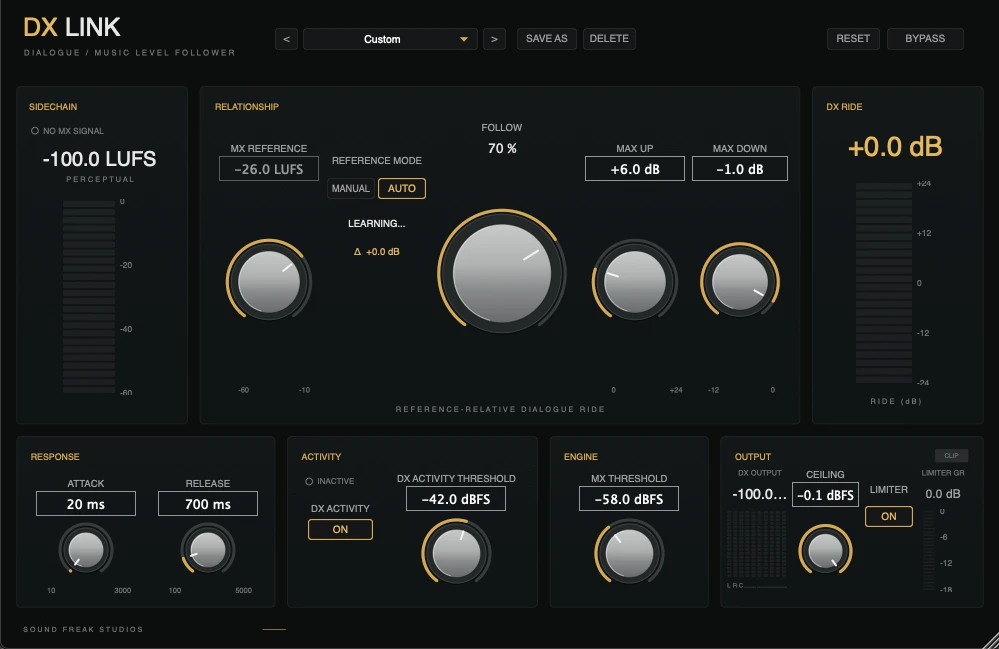
Version 1.0.1 rebuilds the ride around one clear relationship: current MX level minus its normal reference, multiplied by Follow, then contained by Max Up and Max Down.
DXLink uses an external mono music sidechain while applying one linked ride across the supported dialogue bus. The DAW must expose both the selected channel layout and the required sidechain or Key Input.
Music levels rarely stay constant. A score may sit quietly under dialogue, then suddenly build by 10, 15 or even 20 dB. Keeping dialogue intelligible traditionally means riding the DX bus throughout the mix.
DXLink 1.0.1 measures how far the music has moved above or below its normal reference level. Follow determines how much of that change reaches the dialogue, while Max Up and Max Down define the permitted range.
Use Manual MX Reference when you want a fixed baseline. Use Auto when you want DXLink to establish and slowly adapt to the underlying music bed while letting short swells drive the ride.
When dialogue is absent, DX Activity helps prevent unnecessary boosting of room tone and gaps. When music disappears, Auto Reference freezes and the ride returns smoothly toward unity. This is a dynamic relationship between Dialogue and Music, designed for audio post. It is not music ducking or compression.
This short demonstration shows how DXLink responds as the incoming Music level moves, translating that relationship into a smooth, controlled Dialogue ride.
Let music guide the ride while you decide its strength, range and response.
Place DXLink on your Dialogue track or bus. It processes the DX signal passing through its main input.
Feed your Music bus into the external mono sidechain / Key Input so DXLink can measure the score against its reference.
Set a Manual MX Reference, or select Auto to learn the normal music bed. Follow, Max Up / Down, Attack and Release shape the response.
Dialogue follows the music's movement within the limits you set, then returns smoothly toward unity.
Perceptual analysis, deliberate response and linked multichannel control, organized around the decisions you make in a session.
Because version 1.0.1 rides changes around a reference, presets describe a response rather than depending on one absolute music level. Choose a starting point, refine it to the scene, and save your own settings.
Everyday reference-relative dialogue/music riding
Subtle, transparent dialogue protection
Quicker response to changing score
Stronger riding for dense or loud music
Maximum intervention for difficult relationships
| Version | DXLink 1.0.1 |
|---|---|
| Platform | macOS 11 or later Windows 10 or 11 (64-bit) |
| Architecture | Mac: Apple Silicon + Intel Universal Binary Windows: Intel + AMD x64 |
| Formats | AAX Native + VST3 on Mac and Windows Audio Unit (AU) on Mac |
| Channel layouts | Mono / Stereo / 5.0 / 5.1 / 7.0 / 7.1 / 7.0.2 / 7.1.2 |
| Music input | External mono sidechain / Key Input |
| MX Reference | Manual / Auto |
| Default ride mode | Up Only (Max Down 0 dB) |
Your DAW or host must be capable of routing an external mono sidechain / Key Input to DXLink.
Route the Dialogue signal through the main input and the Music signal to the sidechain. Set a Manual reference or let Auto learn the normal music bed; linked ride and limiter processing preserve the internal balance of supported multichannel dialogue stems.
Close your DAW, then run the macOS PKG or DXLink_Windows_x64_Setup.exe. On Windows, select VST3, AAX or both, and choose Standard or Legacy AAX. Reopen your DAW and activate online with your purchase email and license key. Your license supports up to two computers across Mac and Windows.
For help checking your setup, contact hello@soundfreakstudios.com.
DXLink compares music from an external sidechain with its MX Reference and applies a smooth, controlled gain ride to dialogue. It creates a dynamic dialogue/music relationship rather than compressing or ducking the music.
Version 1.0.1 introduces reference-relative riding, Manual and Auto MX Reference modes, proportional Follow behaviour, an Up Only default at Max Down 0 dB, faster response, an internal deadband and soft knee, improved silence handling, and retuned presets.
Manual lets you set the normal music reference directly. Auto learns the underlying music bed slowly, freezes its reference during silence, and lets short swells appear as positive MX changes instead of chasing them. Switching modes transfers the current reference for a smooth learn-then-freeze workflow.
Yes. With Max Down at its 0 dB default, DXLink operates in Up Only mode: it may raise dialogue when music rises above the reference, but it will not reduce dialogue below unity.
Insert DXLink on your Dialogue track or bus, then feed your Music bus into its external mono sidechain or Key Input. Your DAW or host must support this routing.
Yes. DXLink includes AAX Native and VST3 for Windows 10 and 11 on 64-bit Intel and AMD systems. The signed Windows installer offers Standard or Legacy AAX.
DXLink 1.0.1 includes AAX Native and VST3 for macOS and Windows, plus Audio Unit (AU) for macOS. Mac builds are Universal for Apple Silicon and Intel; Windows builds support Intel and AMD x64. It supports Mono, Stereo, 5.0, 5.1, 7.0, 7.1, 7.0.2 and 7.1.2. Layout availability depends on the DAW and plugin format.
Yes. DXLink supports a 7.1.2 dialogue layout while using an external mono music sidechain or Key Input. Linked processing applies the ride across the multichannel dialogue bus so its internal balance is preserved. The host must expose both the dialogue layout and the required sidechain routing.
DX Activity Detection helps avoid aggressively riding room tone and silence when dialogue is absent. In Auto mode, the MX Reference also freezes through music silence so the stored baseline does not drift, while the dialogue ride returns smoothly toward unity.
Set the reference or let Auto learn it. DXLink follows the score's movement within your limits, then returns dialogue smoothly toward unity.