Put MXCarve on music.
Insert the plugin on your music track or bus. It processes the music passing through its main input.
Keep the music in the scene. MXCarve uses your dialogue sidechain to shape a moving pocket in the music, giving the words space while preserving the character of the score.
USD · Secure Payhip checkout · Instant digital delivery
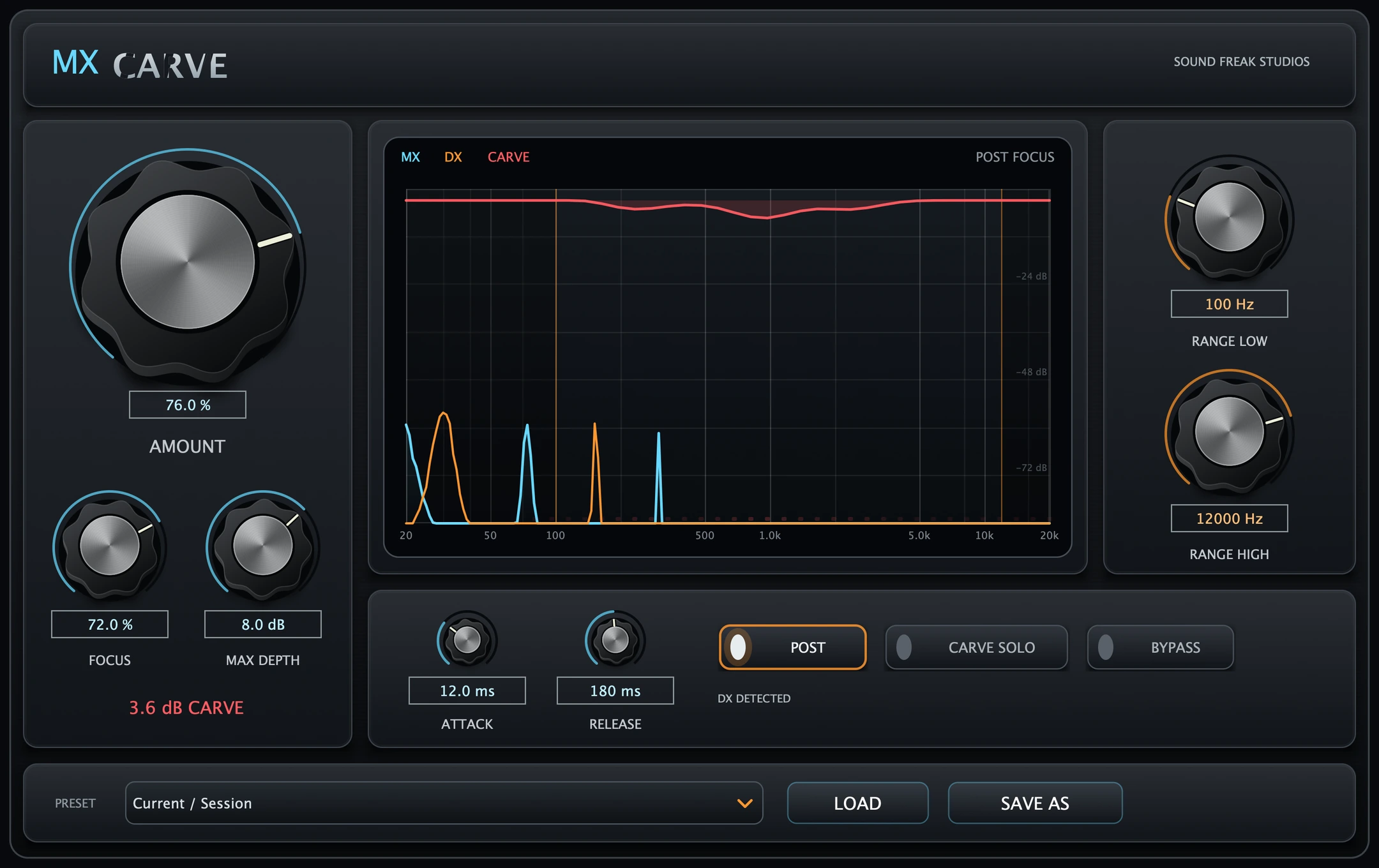
A dense score can compete with the words at exactly the wrong moment. MXCarve listens to dialogue through an external sidechain and shapes the music around its spectrum.
Its 32-band engine gives you control over the strength, width and depth of the carve. Choose the frequency range that needs space, then tune how naturally the pocket opens and recovers.
Start with subtle clearance or move toward a more assertive carve. Watch the live analyzer and use Carve Solo to hear the music being removed as you refine the balance.
Explore the MXCarve demonstration, then try the workflow in your own session: music on the main input, dialogue on the sidechain, and a carve shaped to the scene.
Compare in context with Bypass, and use Carve Solo to audition exactly what the processing removes.
Insert the plugin on your music track or bus. It processes the music passing through its main input.
Route dialogue to the external sidechain or Key Input. Use a compatible host that exposes the routing and channel layout you need.
Raise Amount from its neutral 0% starting point. Set Focus, Max Depth and the frequency range, then tune Attack and Release while listening in context.
MXCarve applies a linked reduction curve across full-range channels while LFE passes through unchanged. The engine reports zero algorithmic latency to the host.
Choose a factory preset, fine-tune the carve, and save your own MXCarve presets for future sessions.
For compatible Pro Tools systems.
For compatible VST3 hosts.
For Logic Pro and other compatible Audio Unit hosts on macOS.
| Platform | macOS 11 or later Windows 10 or 11 (64-bit) |
|---|---|
| Architecture | Mac: Apple Silicon + Intel Universal builds Windows: Intel + AMD x64 |
| Host | Compatible 64-bit audio host with external sidechain support |
| Installer | Signed, Apple-notarized macOS PKG Digitally signed Windows EXE |
Your DAW may have additional system requirements. Layout support varies by host and format. The Windows installer includes Standard AAX for supported surround and height layouts, or Legacy AAX for older Pro Tools systems using conventional layouts up to 7.1. Install one AAX edition at a time. Close your DAW and rerun the installer to switch editions. Available layouts depend on your host, track format and selected edition.
Close your DAW, then run the macOS PKG or MXCarve_Windows_x64_Setup.exe. On Windows, select VST3, AAX or both, and choose Standard or Legacy AAX. Reopen your DAW and let it scan before inserting MXCarve.
Activate online using the purchase email and MXCarve license key from your order. A successful check provides up to 30 days of offline authorization. No customer iLok hardware or iLok license is required.
For installation, routing or activation help, contact hello@soundfreakstudios.com.
Insert MXCarve on your music track or bus and send dialogue to its external sidechain. The dialogue spectrum guides the moving pocket in the music. Your host must support external sidechain routing.
MXCarve includes AAX Native and VST3 for macOS and Windows, plus Audio Unit (AU) for macOS. It supports macOS 11 or later on Apple Silicon and Intel Macs, and Windows 10 or 11 on Intel and AMD x64 PCs. A compatible 64-bit host with external sidechain support is required.
Yes. MXCarve supports matching mono, stereo, surround and height layouts, including 5.0, 5.1, 7.0, 7.1, 7.0.2 and 7.1.2, with additional standard layouts through 9.1.6 where supported by the host and plugin format. A linked reduction curve processes full-range channels while LFE passes through unchanged.
MXCarve reports zero algorithmic latency to the host.
Activate online using the purchase email and MXCarve license key from your order. The license supports up to two computers across macOS and Windows. A successful check provides up to 30 days of offline authorization. No customer iLok hardware or iLok license is required.
Give the words a moving pocket in the score, with the range, depth and timing under your control.