Catch the moment.
Insert Session Board, follow your host’s timecode and add a new entry. Type a manual timecode when you’re working from a supplied notes list.
Home / Plugins / Session Board
Session Board / Timecoded session diaryYour session diary inside your DAW. Capture mix notes, organise revisions and keep reference images beside the cue. From the first dialogue pass to final delivery, know what needs your attention.
Free 14-day demo · Secure Payhip checkout
Prefer Gumroad? Get Session Board on Gumroad ↗
A director’s comment, an ADR pickup, a sound effect to replace. Small notes add up quickly during a mix. Session Board keeps them together inside the session you’re working on.
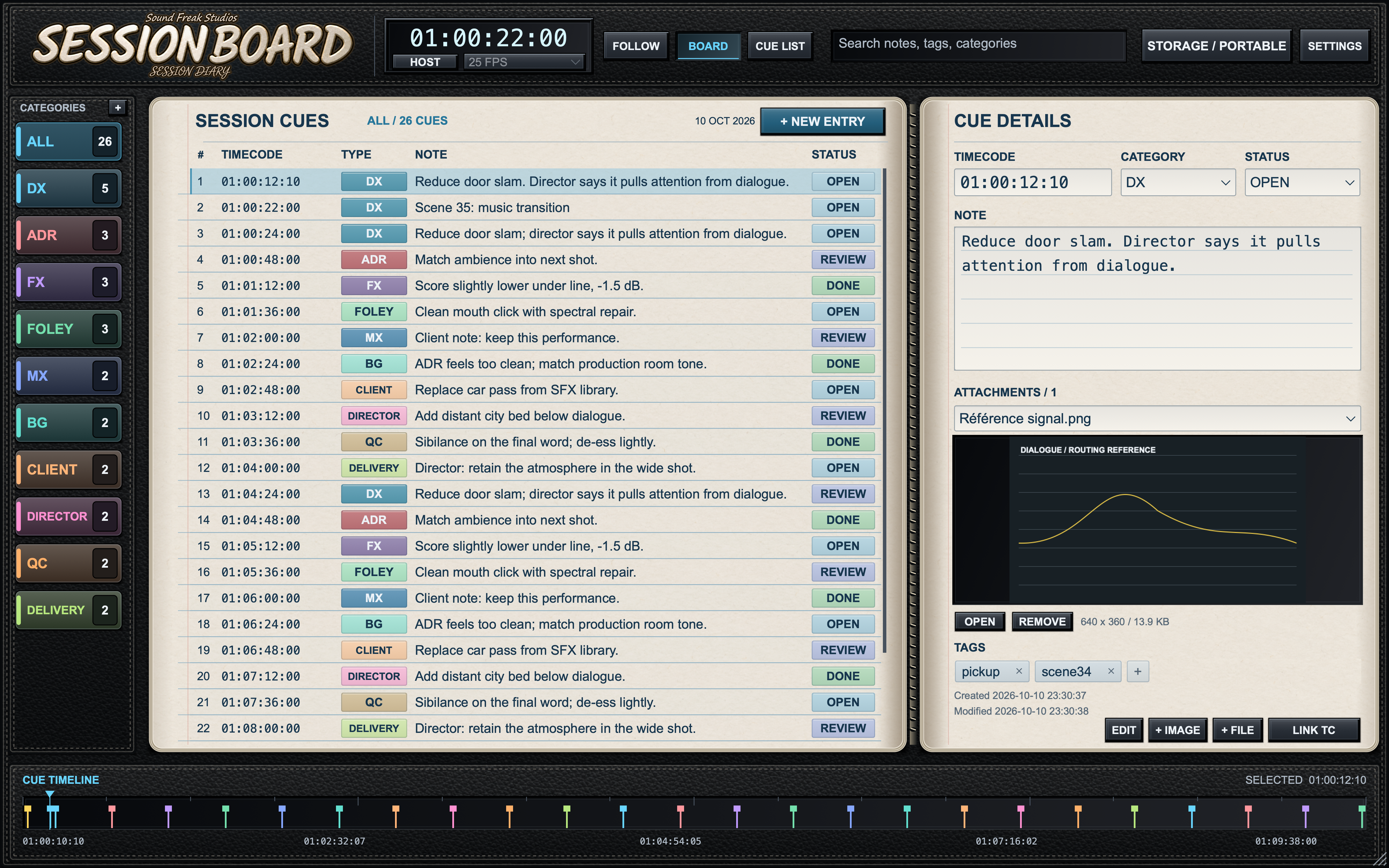
Capture the host timecode, choose a category and write the note. Add a reference image or supporting file, then track the cue from Open to Review to Done.
The leather-bound diary, ruled pages and colour-coded tabs make a busy cue list easy to scan. Resize the interface to suit your workspace while your audio passes through unchanged.
Categories on the left. Timecoded cues in the centre. The selected note and its references on the right.
Shown with sample entries and a reference image. Open the image to view every detail.
Insert Session Board, follow your host’s timecode and add a new entry. Type a manual timecode when you’re working from a supplied notes list.
Choose a category, add tags and attach useful references. Filter by department or search for a scene, phrase or task.
Move cues through Open, Review and Done. Export a CSV for a handover, and keep the complete board folder with the project.
For compatible Pro Tools systems.
For Nuendo, Cubase and compatible VST3 hosts.
For Logic Pro and compatible AU hosts.
| Operating system | macOS 12 Monterey or later |
|---|---|
| Architecture | Apple silicon + Intel (Universal) |
| Formats | AAX Native, VST3 and AU |
| Licence | Two computers per paid licence |
| Trial | 14 days; internet required to start |
Use a DAW version compatible with your macOS version and selected plugin format. This release is for Mac.
Download the installation and user manual (PDF) ↗
Need a hand? hello@soundfreakstudios.com
Download the free demo through Payhip. On first launch, choose Try Demo — 14 Days and start your trial online.
After 14 days, the interface dims and a paid licence is required to continue using the note-management features. Your audio remains unchanged.
Activate your paid licence with your purchase email and key. One licence supports two computers, with up to 30 days offline before renewal.
The macOS installer includes AAX Native for compatible Pro Tools systems, VST3 for hosts such as Nuendo and Cubase, and AU for Logic Pro. macOS 12 or later is required, on Apple silicon or Intel. Your DAW must also support your macOS version. This release is for Mac.
Insert Session Board on a track carrying audio or an output bus receiving the mix. Open Settings → Host timecode setup, enter your project’s frame rate and timecode at timeline zero, then choose Apply & Follow Host. Play the project and save it. HOST* indicates the configured host clock; an empty or inactive track may not provide updates.
Yes. Enter a fixed timecode in the top timecode display for manual cue capture, or edit a cue’s timecode in its details. Return to Host mode to follow the DAW. Selecting a cue does not move the DAW playhead.
Yes. Open Storage / Portable, choose Project Folder, select your project’s folder and apply the location. Choose this folder manually: automatic detection of a DAW project’s name and path is not available in every host.
Transfer the complete Session Board folder, including its database and attachments, together with the DAW project. Install and activate Session Board on the destination computer. If the saved path is unavailable, locate the transferred board when prompted. The DAW project file alone does not contain all external board files.
Export the cue list as an Excel-friendly CSV for review or handover. CSV is a report: it does not include the attachment files and is not a board backup.
Choose Try Demo — 14 Days on first launch to start the trial online, or activate using your purchase email and license key. After 14 days, the interface dims and the plugin’s note-management features require a paid license. Audio remains unchanged. A paid license supports two computers, with up to 30 days offline before renewal.
A session diary for dialogue edits, director feedback, sound design and the details that make a finished mix.
macOS · AAX Native + VST3 + AU · Free 14-day demo