Rooms & interiors
Room · Small Room · Hall · Warehouse · Cathedral · Bathroom · Empty Office · Car Interior · Custom
Home / Plugins / Distance Designer
Distance Designer / Perspective processorCinematic perspective in one move. Bring dialogue, Foley and sound effects into the scene. Distance Designer combines tonal shaping, reflections, ambience and optional propagation delay to help close recordings feel farther away.
USD · Direct Payhip checkout · Free 14-day demo
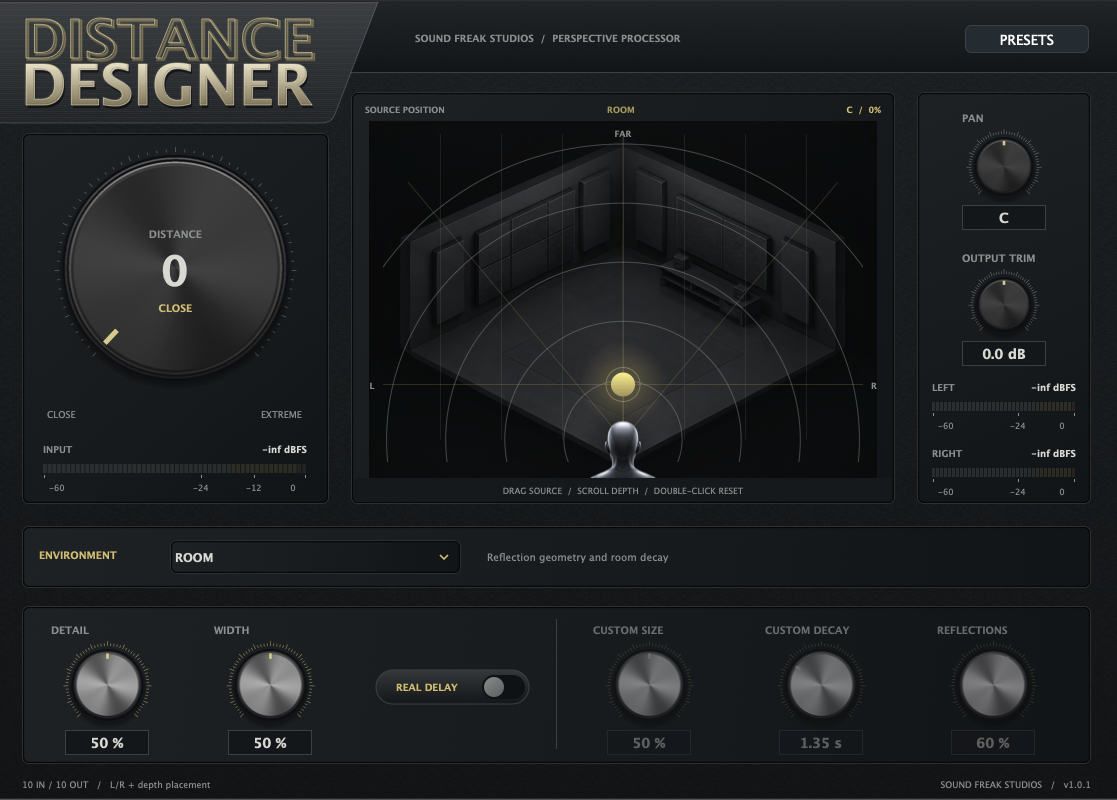
A close recording can feel disconnected from a wide shot. Distance Designer brings together the cues that help place a sound farther away, from tone and reflections to ambience and optional travel time.
Move the source in the interactive display, choose an environment, and shape the result with Detail, Width, Pan and Output Trim. The background changes with your environment, keeping the selected space visible as you work.
Use it for dialogue perspective, Foley placement and sound design. Save your settings, then automate the movement as the scene develops.
Watch the Distance Designer demo, then explore the environments, source positioning and perspective controls in your own session with the free 14-day demo.
From an adjoining room to an open valley, select a starting point that suits the scene. Choose Custom to adjust Size, Decay and Reflections yourself.
Room · Small Room · Hall · Warehouse · Cathedral · Bathroom · Empty Office · Car Interior · Custom
Street · Street Slapback · Narrow Alley · Courtyard · Forest · Open Field · Stadium · Valley
Corridor · Stairwell · Tunnel · Underpass · Parking Garage · Subway Platform · Adjoining Room · Upstairs · Downstairs · Behind Door
Choose Dry when you want distance shaping without an environment’s added ambience.
Insert Distance Designer on a dialogue, Foley or effects track. For left/right placement of a mono source, select a mono-to-stereo instance or a supported stereo output layout.
Select an environment and raise Distance, or drag the source in the position display. Adjust Pan to place the sound left or right.
Shape Detail, Width and Output Trim while listening in context. Add Real Delay when you want distance-related timing, then save a preset or automate the movement.
For compatible Pro Tools systems, including AudioSuite.
For compatible 64-bit VST3 hosts.
For Logic Pro and other compatible AU hosts.
| Platform | macOS 12 Monterey or later |
|---|---|
| Architecture | Universal Mac: Apple Silicon + Intel |
| Host | Compatible 64-bit audio host |
| Channel layouts | Mono, mono-to-stereo, stereo, 5.0, 5.1, 7.0, 7.1, 7.0.2 and 7.1.2, where supported by the host and format |
Your DAW must support your macOS version and the selected plugin format. Stereo or compatible multichannel output is required for panning. A mono instance feeding a stereo bus still processes with a mono output.
For installation, routing or activation help, contact hello@soundfreakstudios.com.
Get the free demo through Payhip. The same Mac installer offers Activate License and Try Demo — 14 Days on first launch. You don’t need a license key to start the demo; an internet connection is required.
After 14 days, the interface dims and audio passes through dry until you activate a paid license.
A paid license supports two computers. Activate online with your purchase email and license key. Paid authorization supports up to 30 days offline before renewal.
Distance Designer requires macOS 12 Monterey or later and a compatible 64-bit audio host. One Universal Mac installer includes AAX Native, VST3 and AU for Apple Silicon and Intel. Your DAW must support your macOS version and the selected format.
Yes. Use a mono-to-stereo instance or another supported layout with stereo output. A mono instance still has a mono output, even when its track feeds a stereo bus. Available layouts depend on your host and plugin format.
Yes. The AAX version supports AudioSuite in compatible Pro Tools systems. Select the clip or region, open Distance Designer in AudioSuite and process it. Extend the selection beyond the sound to include the reverb and delay tail.
Yes. Choose from 18 factory presets or save your own settings. All processing parameters are available for host automation. Enable the parameters in your DAW and use its automation modes; shortcuts and lane selection depend on the host.
Download the free demo through Payhip, install Distance Designer and choose Try Demo — 14 Days on first launch. No license key is required for the demo. An internet connection is needed to start it. After 14 days, the interface dims and audio passes through dry until you activate a paid license.
One paid license supports two computers. Activate online with your purchase email and Distance Designer license key. Paid authorization supports up to 30 days offline before renewal.
Shape depth, reflections and placement with a perspective processor built for dialogue, Foley and sound effects.
AAX Native + VST3 + AU · macOS 12+ · Apple Silicon + Intel