
Recover working space
Fit more useful sound effects on the drives you already own.
Home / Plugins & Utilities / Mono Slimmer
 Mono Slimmer / Standalone macOS utility
Recover valuable hard-drive space without losing the sound. Mono Slimmer finds stereo files whose left and right channels are identical, then converts verified dual-mono audio into proper mono files.
USD · Scan folders free · Secure Payhip checkout · Instant digital delivery
Professional sound-effects libraries can contain tens of thousands of files. Foley, footsteps, impacts, doors, props, weapons, interface sounds and single-microphone recordings are often stored as stereo—even when both channels contain exactly the same signal.
Those files are not genuinely stereo. The second channel adds no width, direction or spatial detail; it simply stores the same audio information again.
Mono Slimmer finds that hidden duplication. It scans entire folders, identifies verified dual-mono files and shows the estimated space you can recover before you convert anything.
One duplicated channel may look insignificant. Across a working library, its cost spreads to your primary drive, backup drive, archive and every transfer.
Fit more useful sound effects on the drives you already own.
Remove redundant channel data before it is copied into secondary and portable storage.
Smaller archives are easier to transfer, duplicate and maintain.
When storage prices climb, reclaiming wasted space can postpone another hardware purchase.
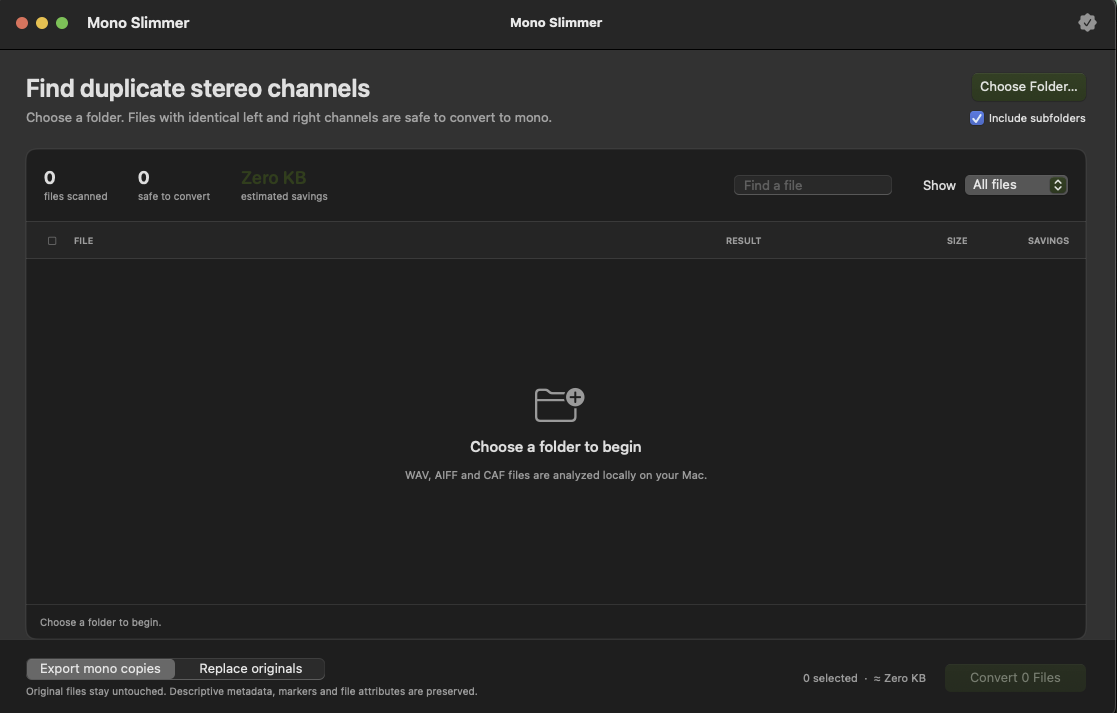
Choose the folder that contains your sound-effects or audio files. Include subfolders when you want to inspect a complete library.
Mono Slimmer analyses WAV, AIFF and CAF files locally and lists stereo files whose left and right channels are identical.
Filter and review the results, then check the estimated storage you can recover. Scanning is free.
Activate your license, select the verified files and export mono copies or replace the originals according to your workflow.
Real stereo files contain different information in their left and right channels. Mono Slimmer targets files only when those channels are verified as identical.
All analysis and processing take place locally. Sound-effects files are not uploaded to a server or cloud-processing service.
Scan eligible Wave audio files.
Inspect Audio Interchange files.
Analyse Core Audio Format files.
| Version | 0.2.1 |
|---|---|
| Platform | macOS 14 Sonoma or later |
| Architecture | Apple Silicon + Intel Macs |
| Installer | Signed macOS PKG · installs in Applications |
Mono Slimmer is a standalone macOS application. It is not an AAX, VST3 or AU plugin. A Windows version is not included.
Open Mono Slimmer, choose Payhip as the purchase platform, then enter the email and license key from your Payhip receipt or download page. You can deactivate a Mac when you need to free an activation seat.
For installation or activation help, contact hello@soundfreakstudios.com.
It scans folders for stereo files whose left and right channels contain identical audio. Those verified dual-mono files can then be converted to proper mono, removing redundant channel data while keeping the sound itself intact.
Yes. Scanning is free, so you can discover how many files are safe to convert and estimate the potential storage savings before unlocking conversion.
Mono Slimmer is intended to identify only verified identical channels. Genuine stereo recordings contain different left and right information and are not dual-mono files. Review the results before converting.
No. Analysis and conversion happen locally on your Mac. An internet connection is required only for license activation.
Mono Slimmer requires macOS 14 Sonoma or later and supports Apple Silicon and Intel Macs. The application scans WAV, AIFF and CAF audio files.
Scan your folders free, see the space hiding inside dual-mono files, and make more room on the drives you already own.